This article is in continuation to Get a domain and route traffic to static IP using Cloudflare.
In this post, we will see how we can install nginx on our Raspberry Pi (running Ubuntu 24.04) and divide incoming traffic to different APIs.
Why are we doing this?
So our current setup appears like that:
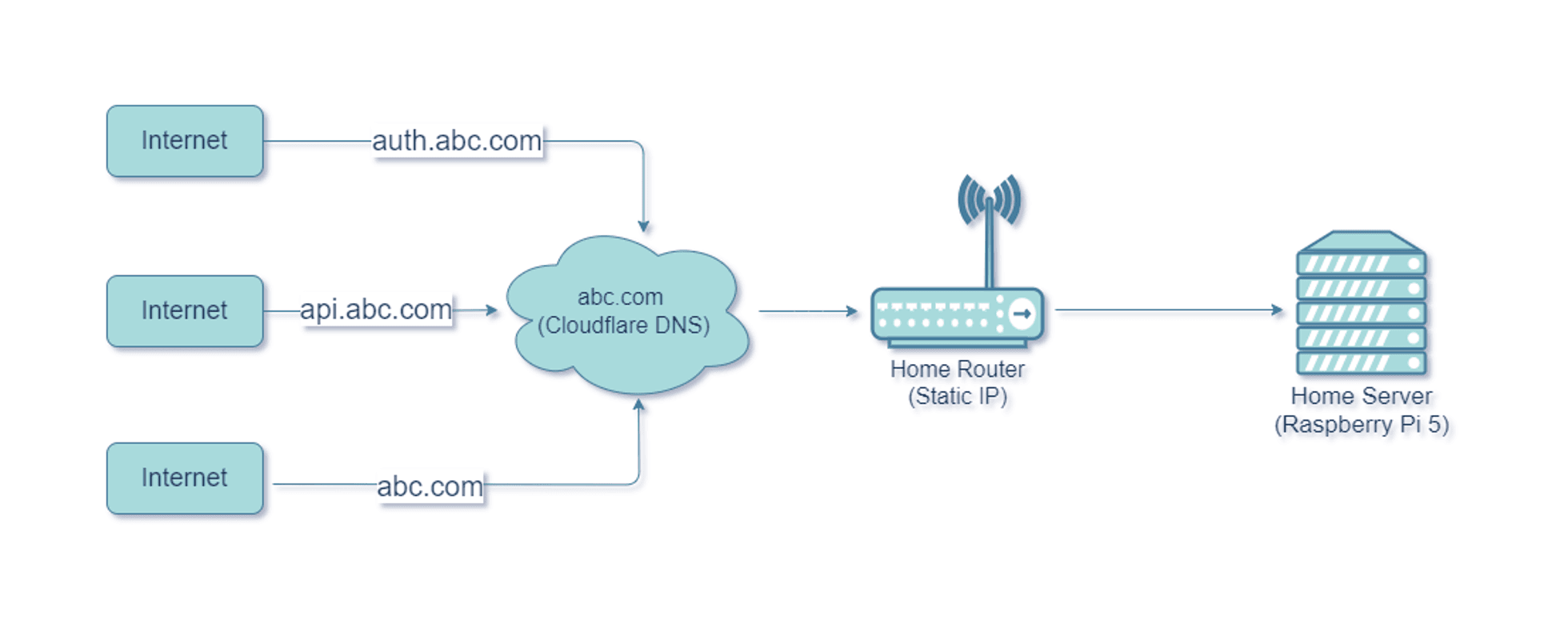
As we can see, the traffic for all subdomains is going to our router, which in turn, is forwarded to our home server. What I need to happen is:
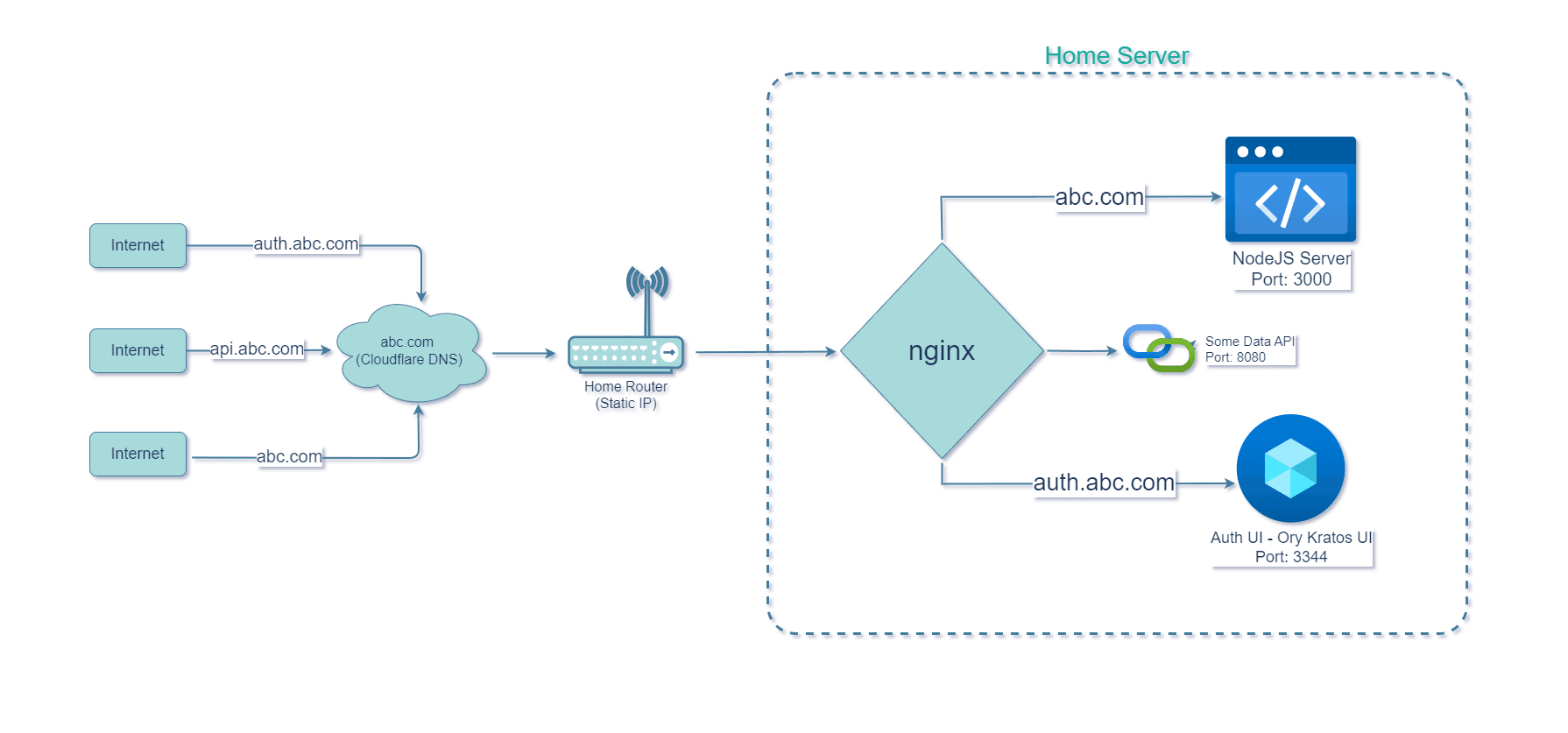
- My main website home page should be served when someone goes to abc.com.
- Authentication page should be on auth.abc.com.
But since I am pointing both my domains to same IP Address, we need some way to segregate traffic coming from root domain and subdomain(s) to respective services on our single server.
The solution here is to use a reverse proxy, like nginx. We can configure it to route incoming traffic based on the configuration we provide.
Ultimately we want to configure nginx such that it does this:
Let’s get started…
Install Nginx and enable SSL for your domain on Ubuntu
This process is straightforward. We need to install 2 things:
- nginx
- certbot (for https)
Login as root and run the following command:
apt-get install nginx certbot python3-certbot-nginx
Note*: Please replace neutronxinnovation.com everywhere with the domain you purchased!
1. Create a default configuration for the main website. To do this create the file neutronxinnovation.com at /etc/nginx/sites-available/ and add following content:
cd /etc/nginx/sites-available/
nano neutronxinnovation.com
Save the config and close nano.
2. sites-available directory contains the sites which are available. But to make it alive, it should also be present in sites-enabled. Hence, we will create a symbolic link to the sites-enabled directory.
ln -s /etc/nginx/sites-available/neutronxinnovation.com /etc/nginx/sites-enabled/neutronxinnovation.com
3. Now we can configure SSL by asking Certbot to automatically add a certificate from LetsEncrypt. When prompted choose to redirect HTTP traffic to HTTPS.
certbot --nginx -d neutronxinnovation.com
After running the certbot command, you will see that many things have been added for you in the config you created:
cat /etc/nginx/sites-enabled/neutronxinnovation.com
server {
      listen 80;
      server_name neutronxinnovation.com;
      if ($host = neutronxinnovation.com) {
               return 301 https://$host$request_uri;
      } # managed by Certbot
}
server {
   listen [::]:443 ssl ipv6only=on; # managed by Certbot
   listen 443 ssl; # managed by Certbot
   ssl_certificate /etc/letsencrypt/live/neutronxinnovation.com/fullchain.pem; # managed by Certbot
   ssl_certificate_key /etc/letsencrypt/live/neutronxinnovation.com/privkey.pem; # managed by Certbot
   include /etc/letsencrypt/options-ssl-nginx.conf; # managed by Certbot
   ssl_dhparam /etc/letsencrypt/ssl-dhparams.pem; # managed by Certbot
}
Now restart nginx service:
systemctl restart nginx
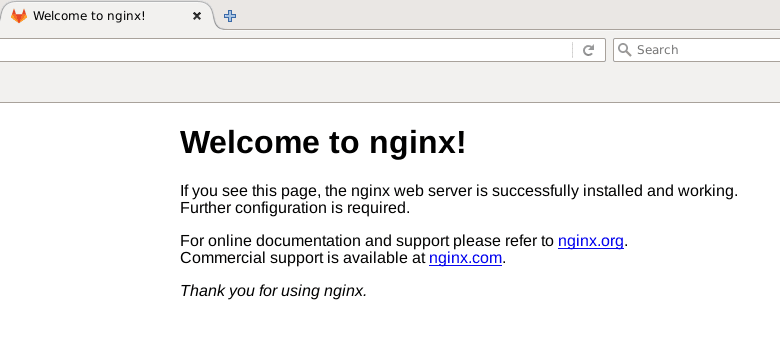
Now if you try to open your browser and enter your domain name, you should be able to access your website if everything is correct. It should show “Welcome to nginx” page similar to this:
Configure Nginx and route your main website to root and auth subdomain to Ory Kratos (or any other service)
Now replace the nginx configuration with this. I will explain everything. Make sure you replace neutronxinnovation.com with your domain.
Here we’re pre-configuring our nginx for Ory Kratos even if we don’t have it installed yet. We will see more on next article.
upstream kratos_ui {
        server 127.0.0.1:3000;
}

upstream kratos_public_api {
        server 127.0.0.1:4433;
}

upstream kratos_admin_api {
        server 127.0.0.1:4434;
}

server {

    server_name auth.neutronxinnovation.com;

    listen 443 ssl http2;

    ssl_certificate /etc/letsencrypt/live/neutronxinnovation.com/fullchain.pem; # managed by Certbot
    ssl_certificate_key /etc/letsencrypt/live/neutronxinnovation.com/privkey.pem; # managed by Certbot
    include /etc/letsencrypt/options-ssl-nginx.conf; # managed by Certbot
    ssl_dhparam /etc/letsencrypt/ssl-dhparams.pem; # managed by Certbot

    location / {
        proxy_pass              http://kratos_public_api;
        proxy_redirect          off;
        proxy_set_header        Host                    $host;
        proxy_set_header        X-Real-IP               $remote_addr;
        proxy_set_header        X-Forwarded-For         $proxy_add_x_forwarded_for;
    }

    location /admin {
    # Example of managing access control
    # for the /admin endpoint
    # in that example we allow access
    # either from the subnet
    # or by checking query parameter ?secret=
                set $allow 0;
    # Check against remote address
                if ($remote_addr ~* "172.24.0.*") {
                        set $allow 1;
                }
    # Check against ?secret param
                if ($arg_secret = "AOyraklaknscA123SHALSh") {
                        set $allow 1;
                }
                if ($allow = 0) {
                        return 403;
                }

                rewrite /admin/(.*) /$1  break;

                proxy_pass http://kratos_admin_api;
                proxy_redirect          off;
                proxy_set_header        Host            $host;
                proxy_set_header        X-Real-IP       $remote_addr;
                proxy_set_header        X-Forwarded-For $proxy_add_x_forwarded_for;
    }

    location /identities {
                proxy_pass http://kratos_admin_api;
                proxy_redirect          off;
                proxy_set_header        Host            $host;
                proxy_set_header        X-Real-IP       $remote_addr;
                proxy_set_header        X-Forwarded-For $proxy_add_x_forwarded_for;
    }

    location /auth {
            rewrite /auth/(.*) /$1  break;

            proxy_pass http://kratos_ui;
            proxy_redirect          off;
            proxy_set_header        Host            $host;
            proxy_set_header        X-Real-IP       $remote_addr;
            proxy_set_header        X-Forwarded-For $proxy_add_x_forwarded_for;
    }

    error_page 401 = @error401;
    # Catch if 401/unauthorized and redirect for login
    location @error401 {
        return 302 https://auth.warrantify.me/auth/login;
    }

}

server {
    server_name neutronxinnovation.com;

    listen 443 ssl; # managed by Certbot
    ssl_certificate /etc/letsencrypt/live/neutronxinnovation.com/fullchain.pem; # managed by Certbot
    ssl_certificate_key /etc/letsencrypt/live/neutronxinnovation.com/privkey.pem; # managed by Certbot
    include /etc/letsencrypt/options-ssl-nginx.conf; # managed by Certbot
    ssl_dhparam /etc/letsencrypt/ssl-dhparams.pem; # managed by Certbot

    location / {
        root /serverapps/nxi-website/frontend;
        index index.html index.htm;
    }


}

server {

    if ($host = neutronxinnovation.com) {
        return 301 https://$host$request_uri;
    } # managed by Certbot


    listen 80;
    server_name neutronxinnovation.com;
    return 404; # managed by Certbot
}
Explanation:
upstream kratos_ui {
        server 127.0.0.1:3000;
}

upstream kratos_public_api {
        server 127.0.0.1:4433;
}

upstream kratos_admin_api {
        server 127.0.0.1:4434;
}
In this code above, we’re telling nginx that we have following services running on our server where you would typically forward the requests to. We have named them here so that we can reference them by name later.
server {
    server_name neutronxinnovation.com;

    listen 443 ssl; # managed by Certbot
    ssl_certificate /etc/letsencrypt/live/neutronxinnovation.com/fullchain.pem; # managed by Certbot
    ssl_certificate_key /etc/letsencrypt/live/neutronxinnovation.com/privkey.pem; # managed by Certbot
    include /etc/letsencrypt/options-ssl-nginx.conf; # managed by Certbot
    ssl_dhparam /etc/letsencrypt/ssl-dhparams.pem; # managed by Certbot

    location / {
        root /serverapps/nxi-website/frontend;
        index index.html index.htm;
    }
}

server {

    if ($host = neutronxinnovation.com) {
        return 301 https://$host$request_uri;
    } # managed by Certbot


    listen 80;
    server_name neutronxinnovation.com;
    return 404; # managed by Certbot
}
In this code above, we are telling nginx 2 things:
- Redirect all incoming requests to SSL (port 443) [Line 19]
- My main website (neutronxinnovation.com) is accessible on root path [Line 10].
- [Line 11] Also where to serve the main website from. I am using static content (raw html+css+js website) for my root website and have provided the folder path to it:
/serverapps/nxi-website/frontend
- [Line 11] Also where to serve the main website from. I am using static content (raw html+css+js website) for my root website and have provided the folder path to it:
server {

    server_name auth.neutronxinnovation.com;

    listen 443 ssl http2;

    ssl_certificate /etc/letsencrypt/live/neutronxinnovation.com/fullchain.pem; # managed by Certbot
    ssl_certificate_key /etc/letsencrypt/live/neutronxinnovation.com/privkey.pem; # managed by Certbot
    include /etc/letsencrypt/options-ssl-nginx.conf; # managed by Certbot
    ssl_dhparam /etc/letsencrypt/ssl-dhparams.pem; # managed by Certbot

    location / {
        proxy_pass              http://kratos_public_api;
        proxy_redirect          off;
        proxy_set_header        Host                    $host;
        proxy_set_header        X-Real-IP               $remote_addr;
        proxy_set_header        X-Forwarded-For         $proxy_add_x_forwarded_for;
    }

    location /admin {
    # Example of managing access control
    # for the /admin endpoint
    # in that example we allow access
    # either from the subnet
    # or by checking query parameter ?secret=
                set $allow 0;
    # Check against remote address
                if ($remote_addr ~* "172.24.0.*") {
                        set $allow 1;
                }
    # Check against ?secret param
                if ($arg_secret = "AOyraklaknscA123SHALSh") {
                        set $allow 1;
                }
                if ($allow = 0) {
                        return 403;
                }

                rewrite /admin/(.*) /$1  break;

                proxy_pass http://kratos_admin_api;
                proxy_redirect          off;
                proxy_set_header        Host            $host;
                proxy_set_header        X-Real-IP       $remote_addr;
                proxy_set_header        X-Forwarded-For $proxy_add_x_forwarded_for;
    }

    location /identities {
                proxy_pass http://kratos_admin_api;
                proxy_redirect          off;
                proxy_set_header        Host            $host;
                proxy_set_header        X-Real-IP       $remote_addr;
                proxy_set_header        X-Forwarded-For $proxy_add_x_forwarded_for;
    }

    location /auth {
            rewrite /auth/(.*) /$1  break;

            proxy_pass http://kratos_ui;
            proxy_redirect          off;
            proxy_set_header        Host            $host;
            proxy_set_header        X-Real-IP       $remote_addr;
            proxy_set_header        X-Forwarded-For $proxy_add_x_forwarded_for;
    }

    error_page 401 = @error401;
    # Catch if 401/unauthorized and redirect for login
    location @error401 {
        return 302 https://auth.neutronxinnovation.com/auth/login;
    }

}
In this code above, we are telling nginx our configuration for our subdomain auth.neutronxinnovation.com:
- [Line 3] Listen for incoming traffic with this address
- [Line 5] Serve on port 443 (SSL) with http2.
- [Line 7 to Line 10] We are using the same certificate configuration for SSL which we created for our root domain.
- [Line 12] Route all request coming to auth.neutronxinnovation.com root(/) to kratos_public_api service which we created earlier.
- [Line 20] Configuration for /admin endpoints. You should change this according to you or disable it completely.
- [Line 48-54] We are not using it for now.
- [Line 56-64] Here, we’re defining that all requests coming to path “auth.neutronxinnovation.com/auth” should be forwarded to kratos_ui.
- [Line 66-70] Here we’re telling that if the response is 401 from Kratos, we should send the user to main auth page i.e. auth.neutronxinnovation.com/auth/login
And by this, our nginx configuration is complete.
Next, we will see how to install and configure Ory Kratos on our home server/Raspberry Pi 5.